Skip to content




June 3, 2026
Product Lifecycle Management Tools That Help Manufacturers Work Smarter
READ TIME: 7.3 MINS
Product lifecycle management tools help manufacturers work smarter by giving every team access to accurate product information. Instead of relying on spreadsheets, shared folders, email approvals, outdated files, or disconnected business systems, manufacturers can use PLM software to manage product data with more structure and control.
What Are Product Lifecycle Management Tools?
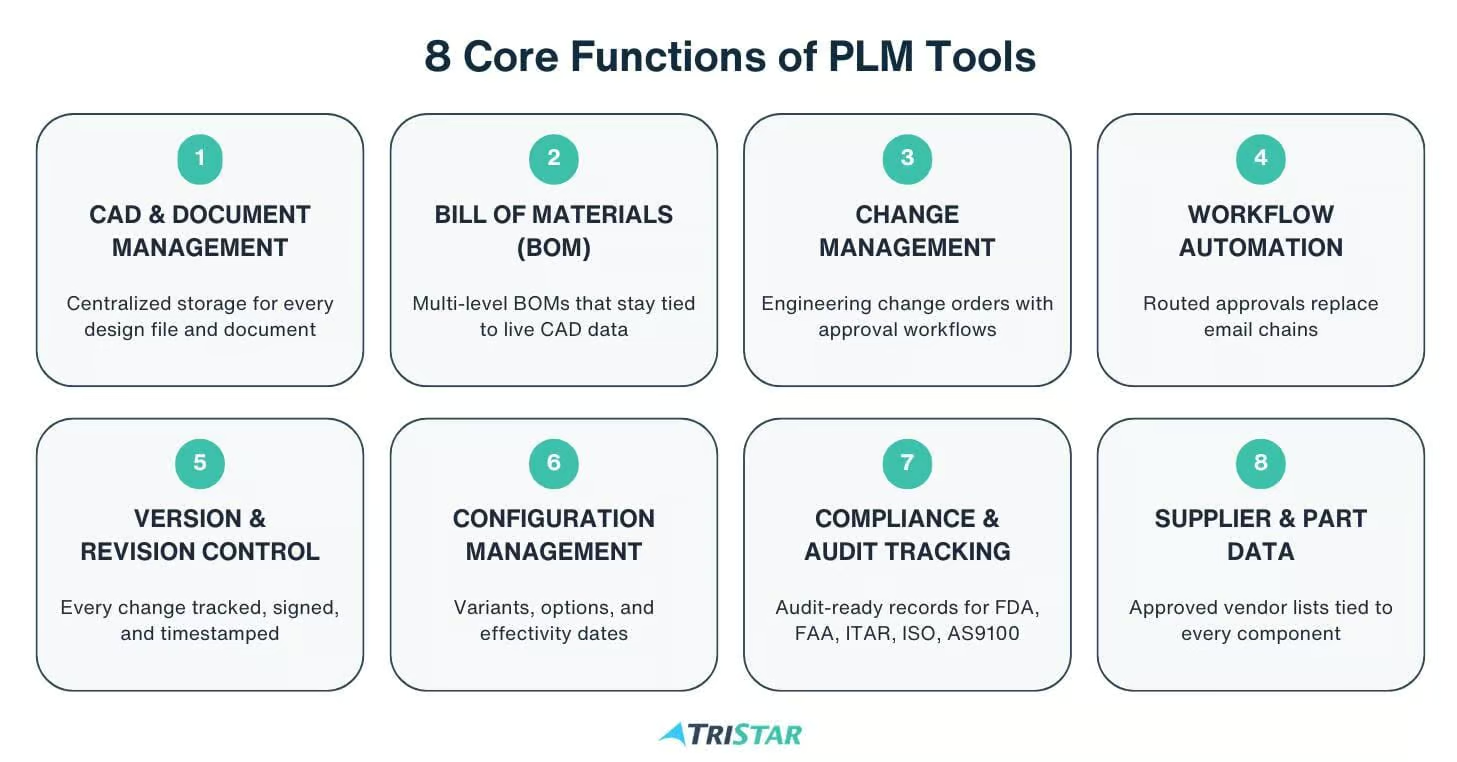
Product lifecycle management tools are software systems that manage product information across the full product’s lifecycle. This can include:
- CAD files
- Drawings, parts
- Product structures
- Bills of materials
- Change management requests
- Manufacturing instructions
- Service data
- Compliance records
Manufacturers use PLM tools because product development involves many people, systems, and decisions. It may go through multiple design changes and need input from engineering, sourcing, production, quality, compliance, and service teams.
A PLM system gives teams a controlled way to create, review, approve, update, and share product data. Instead of relying on manual processes, manufacturers can manage product development through one structured system.
The goal is simple. PLM tools help teams make better product decisions with current, approved information.
Product Lifecycle Management Tools Manufacturers Should Know
Product Data Management Tools
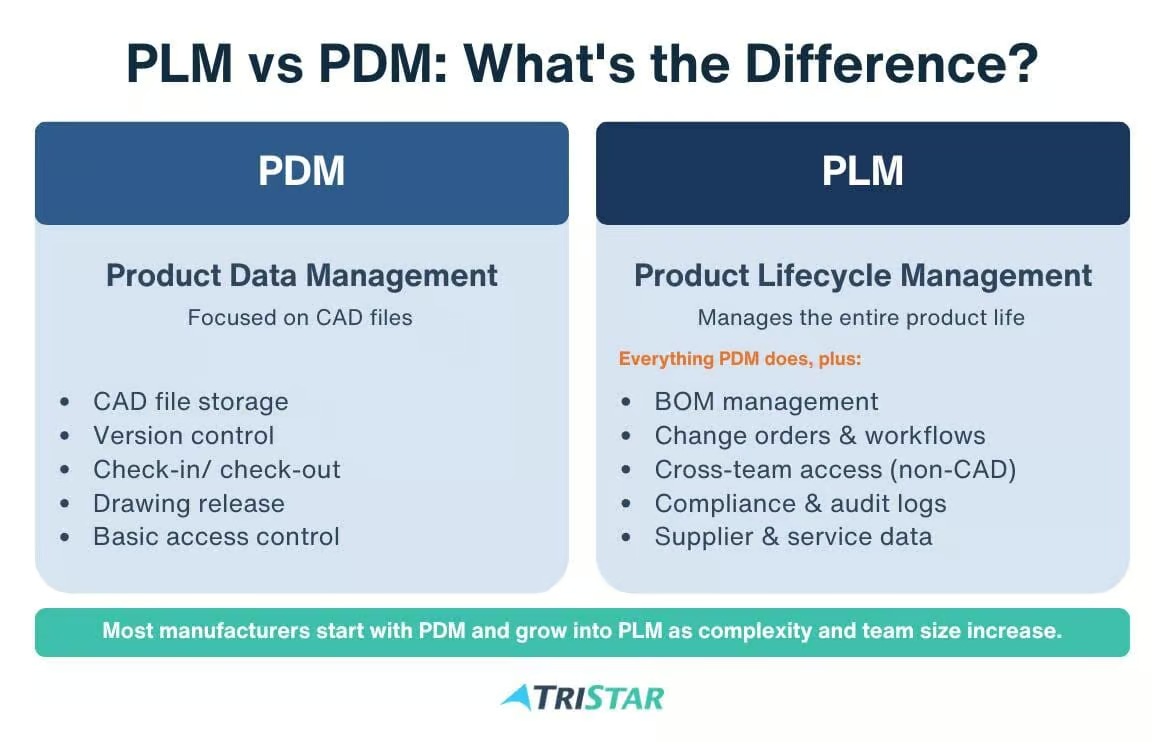
PDM is often one of the first areas where manufacturers feel the need for more structure. As teams grow, shared folders and local files become risky. It gets harder to know which version is current. It also gets harder to protect design data from accidental changes.
A strong PDM tool helps teams manage:
- CAD files
- Drawings
- Product documents
- Design revisions
- User access
- Release status
- Engineering file relationships
This gives engineers a cleaner way to manage their work. It also gives downstream teams more confidence in the data they receive.
BOM Management Tools
Bill of materials management tools help manufacturers manage product structures. A BOM shows the parts, assemblies, quantities, and relationships that make up a product.
BOM accuracy is important because the BOM connects engineering intent to production. If the BOM is wrong, manufacturing may order the wrong part or a product may be built with the wrong revision.
PLM tools like PTC Windchill help manufacturers manage BOMs in a more controlled way. Teams can track part numbers, revisions, approved components, and product structures in one system.
Change Management Tools
Change management tools control how product updates move through the business. This includes engineering change requests, engineering change orders, approvals, reviews, and release workflows.
Product changes can affect many teams. A design change may affect sourcing. A part change may affect inventory. A material change may affect regulatory compliance. A drawing update may affect manufacturing instructions.
Without a formal change process, these updates can be hard to track. PLM change management tools create a clear record of each change. They help teams review changes before release and create a history that can be used for audits, quality reviews, and future product decisions. Wincom Windchill Extensions can also automate change-related workflows that are not part of standard PLM out of the box.
Parts Classification and Reuse Tools
Parts classification tools help engineers find existing parts before creating new ones. This is important because duplicate parts can increase cost and complexity.
When teams cannot find existing parts, they often create new part numbers. Over time, this can lead to bloated part libraries or increase purchasing complexity and inventory waste.
Parts classification tools like MAIT ModelSearch make product data easier to search. Engineers can filter by part type, size, material, geometry, use case, or other attributes. This makes it easier to reuse approved parts across product lines.
CAD and Engineering Design Tools
CAD tools like PTC Creo help engineers design and model products. PLM tools help manage the data that comes from those design tools.
When CAD and PLM systems are connected, engineers can manage design data with more control and check files in and out. They can also track revisions and connect design changes to product structures and approval workflows.
This helps reduce confusion between design work and released product information.
Digital Thread Tools
Digital thread tools connect product information across the full lifecycle. The goal is to make product data easier to follow from design through manufacturing, quality, service, and support.
Many manufacturers have product data spread across disconnected systems. For example, engineering may use one system. Manufacturing may use another. Quality may track records somewhere else.
A digital thread connects these data points. Tools like PTC Windchill Navigate help teams understand how product information changes over time and how one decision affects another part of the business.
How PLM Tools Help Manufacturers Work Smarter
They Create a Single Source of Truth
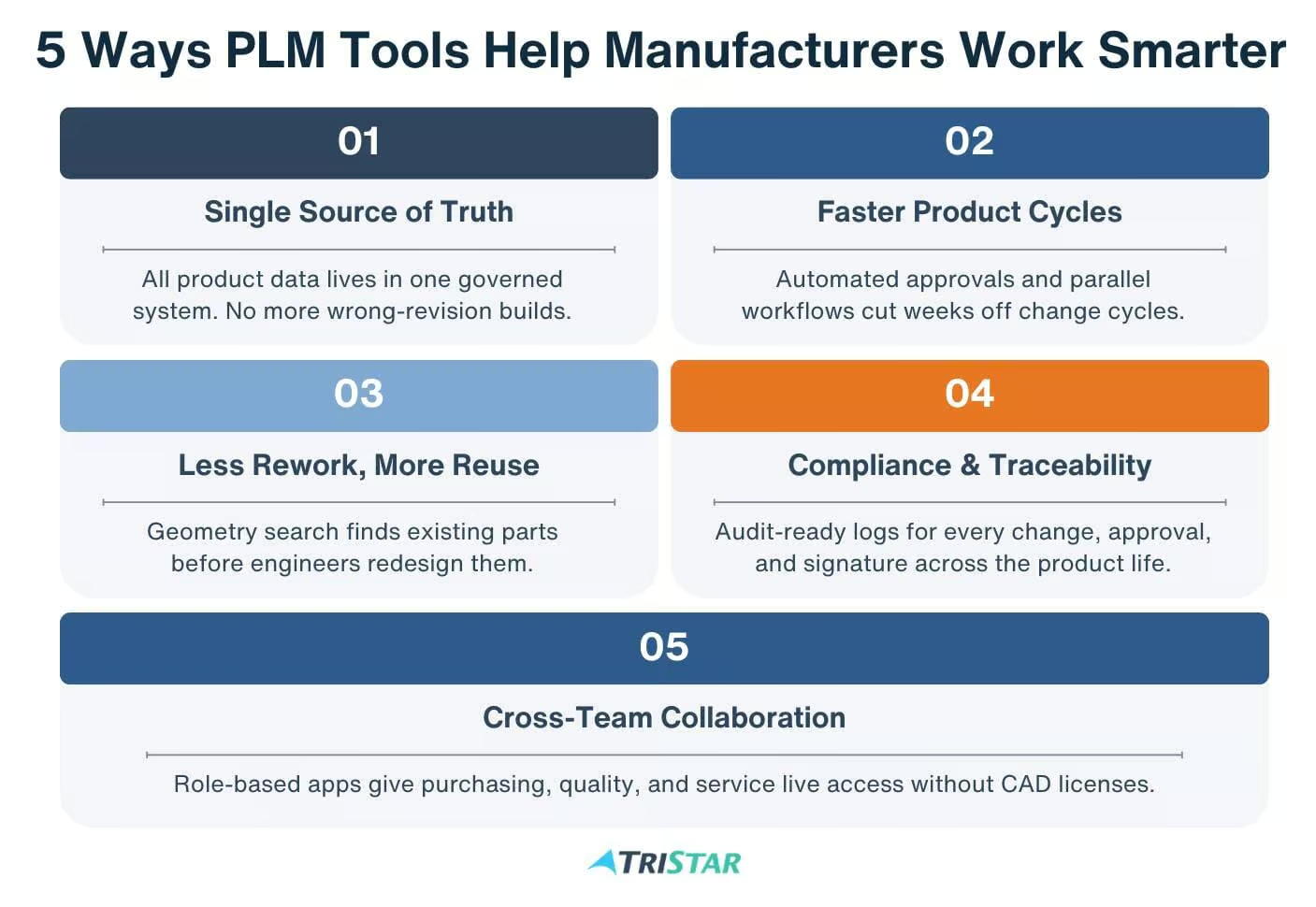
A PLM system gives teams one controlled place to manage product data.
Instead of asking which file is current, teams can go to the PLM system. Instead of searching through emails for approvals, they can review the change record. Instead of guessing which BOM revision to use, they can access the released version.
This matters because product development depends on trust in the data.
They Reduce Rework and Manual Errors
Manual processes increase the chance of mistakes. PLM tools reduce this risk by creating structured workflows and controlled records.
Teams can use PLM to manage revisions, automate reviews, track approvals, and reduce manual data entry. This helps prevent errors before they reach production.
For manufacturers, this can save time and cost. Less rework means fewer delays. Better visibility means teams can act before small issues become larger problems.
They Improve Collaboration Across Teams
Product development is not only an engineering process. Manufacturing, sourcing, quality, service, and leadership all need product information.
PLM tools help these teams work from the same data. They reduce the need for engineers to manually send files or answer the same questions over and over.
They Help Manufacturers Scale
A small team may be able to manage product data with basic tools. That changes as the company grows.
More products create more parts. More parts create more BOMs. More BOMs create more changes. More teams create more handoffs. At some point, manual systems cannot keep up.
Cloud PLM tools like Windchill+ SaaS help manufacturers scale with stronger data governance. They support more users, more product lines, more workflows, and more integrations, giving manufacturers a better foundation for growth.
They Improve Speed Without Losing Control
Manufacturers need to move quickly, but speed cannot come at the cost of control. A rushed change can create production problems and a missing approval can create compliance risk.
PLM tools help teams move faster with structure. Workflows can route tasks to the right people, and change records can show what needs review. This helps manufacturers reduce bottlenecks without losing control of product data.
How to Choose the Right Product Lifecycle Management Tools
Start With Your Product Data Problems
Before comparing software, manufacturers should look at where product data breaks down today. A good PLM strategy starts by asking:
- Where do teams lose time?
- Which handoffs create mistakes?
- What data is hard to find?
- Which processes depend on spreadsheets?
- What information does manufacturing need sooner?
These answers help define what the PLM system needs to fix first. TriStar runs structured PLM capabilities assessments that benchmark your current state against industry best practices and produce a clear roadmap before any deployment work begins.
Review How Teams Work Today
A PLM tool should support real business processes. It should not force every team into a workflow that does not fit the way products are designed, reviewed, released, and built.
Manufacturers should map how work moves from engineering to downstream teams. This includes design reviews, BOM release, change approvals, supplier communication, quality checks, and production handoffs.
Think About Users Outside Engineering
PLM often starts with engineering, but its value grows when more teams can use product data. Manufacturing, quality, sourcing, service, and leadership all need access to accurate information.
The right PLM tool should make product data useful for these teams without making the system harder to manage. This is where digital thread planning becomes important.
Plan for Integration Early
PLM does not work in isolation. It often needs to connect with CAD, ERP, MES, quality systems, service platforms, and supplier tools.
Manufacturers should think about these connections before implementation starts. This helps reduce duplicate data entry and prevents another disconnected system from being added to the business.
Choose a Tool That Can Scale
A PLM tool should support the business today and give it room to grow. More products, more sites, more suppliers, and more users can add complexity fast.
The goal is not just to solve today’s data problems. The goal is to build a foundation that can support long-term product development.
Work With a Partner That Understands PLM Strategy
Software selection is only part of the process. PLM success depends on implementation, migration, configuration, training, and adoption.
TriStar provides PLM implementation, PLM migration, and PTC University training services so manufacturers move from old systems to a working PLM environment without losing engineering hours.
How TriStar Helps Manufacturers Get More Value from PLM Tools
PLM Strategy and Consulting
TriStar helps manufacturers assess their current product development processes. This can include how teams manage CAD files, BOMs, changes, approvals, and product data across the organization.
From there, TriStar’s PLM consulting team helps build a practical roadmap. This matters because PLM is not just a software project. It changes how teams work.
PTC Windchill Implementation and Support
TriStar supports PTC Windchill implementation, configuration, migration, and user training. Windchill can help manufacturers manage product data, BOMs, changes, and digital thread processes in one system.
Our experience with Windchill gives manufacturers access to a team that understands both the software and the business problems behind PLM projects.
CAD, PLM, ALM, and Digital Thread Expertise
Manufacturers often need to connect many tools across product development. This can include CAD, PLM, ALM, ERP, quality systems, and service platforms.
TriStar helps companies think beyond a single tool. Their digital thread approach focuses on connected data across the product lifecycle.
This helps manufacturers reduce silos and improve visibility from design through downstream teams.
Specialized Tools and Extensions
TriStar also supports specialized tools that improve PLM and CAD workflows. These may include tools for part search, Windchill extensions, automation, and data access.
These tools can help manufacturers solve practical problems that standard systems may not fully address. They can improve part reuse, reduce duplicate work, and make product data easier to access.
Work Smarter with TriStar’s PLM Tools and Expertise
The right product lifecycle management tools cut rework, shorten development cycles, and align engineering with manufacturing, service, and compliance.
TriStar Digital Thread Solutions has spent 25+ years helping manufacturers select, deploy, and get value from PLM tools. With 250+ engineers, 1,000+ customers, and 150+ implementations, we bring deep experience across PTC Windchill, Creo, Mathcad, KeyShot, Codebeamer, and the Wincom, Inneo, and MAIT extensions that make these platforms work harder. As a PTC channel partner and PLM Elite reseller, we cover the full path from strategy and consulting through implementation, migration, training, and ongoing support.
Contact TriStar or call 1-800-800-1714 to schedule a consultation.
TriStar Digital Thread Solutions welcomes questions. Feel free to CONTACT US if you can’t find what you’re looking for, or call us at 800-800-1714